Manual folders on every job? Time for a change.

Features

Your Folder Tree, Every Job—Automatic

Your captured folder layout on your private Pressley server—automatic every job, so you're less hostage to one prepress desk. Parallel access · PDF Workflow

The foundation

What Is a File Server?

In most print shops, the file server is the network place where job work lives—usually a Windows share (mapped drive) or NAS path. Prepress, production, and your RIP all expect files in predictable folders: submits, proofs, print-ready PDFs, support specs.

When that structure is built by hand on every order, the file server becomes a bottleneck. Pressley fixes the structure problem automatically on your private hosted Pressley server—not a generic shared cloud drive.

That hosted storage is sized to the server tier you choose (CPU, RAM, and disk). It is built for active Pressley / shopVOX production—not unlimited archive for your entire company history by default.

File server FAQs

Pressley-hosted job storage

Private Windows Server 2025 for your shop only—automation and job files on one machine, with storage limits that match your plan.

  • Active production tree—folders, Switch, PitStop, proofs, and print files for jobs running through Pressley.
  • Local NAS still makes sense—archive, legacy jobs, and overflow many shops keep on their on-prem file server.
  • Pressley-only is possible—with enough storage tier (or added capacity), you can run production entirely on Pressley; we map handoff on your demo.

Standard seats submit through the app; Technical seats can also mount the full tree over VPN. Files live on your hosted server until you archive or copy locally.

Compare server tiers for power and storage.

Technical seat

Your File Server Feel—On Pressley Storage

Prepress and production often work from a mapped drive, not only an app. A Technical seat adds a private VPN to your shop's Pressley server and exposes the entire job tree—the same folders Drop & Ship and automation populate.

Mount the share on Mac or Windows like the drive in your building: browse submits, proofs, and RIP-ready PDFs in Finder or Explorer. Unlimited bandwidth on all servers and all tiers—upload and download with no caps over VPN.

Standard vs Technical seats · FAQ

The hidden tax

When folders are manual, everything slows down

End to end

How Pressley Builds Your Folders

Onboarding captures your layout. After that, every qualifying shopVOX line item gets the same tree—in batches of 100 dockets—before anyone drops a PDF.

  1. 1

    shopVOX trigger

    You pick the workflow step—often when the first line item advances. Not a fixed stage every shop must use.

  2. 2

    Order snapshot

    Pressley captures account, docket, line items, and specs at that moment for all downstream automation.

  3. 3

    Tree created

    Full job folder under your docket range—using your folder names and nesting—ready on the server.

  4. 4

    Files routed

    Drop & Ship and automation place submits, proofs, and production output in the correct folder in your tree every time.

PDF in — correct folder out

Drop & Ship Into the Correct Folder

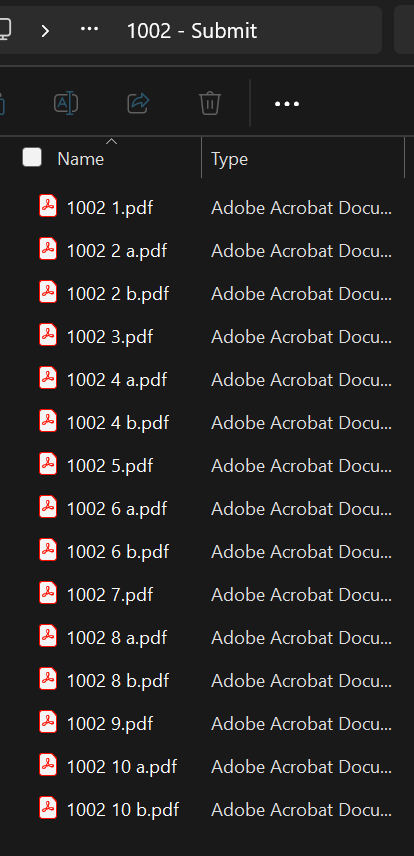
Pressley is built for PDF—the format your customers, Sales, and CSRs already use. Seat holders rename each PDF to the shopVOX order and line and drop it in; Pressley routes it into the correct folder in your tree.

Get clients to send PDFs at the right scale and your team's prepress step is mostly naming and dropping—not rebuilding folders by hand.

  • Single-sided: 26200 1.pdf
  • Double-sided: 26200 1 a.pdf, 26200 1 b.pdf

Use spaces between sales order and line number—not dashes (not 26200-1.pdf).

From there, proofs and production files land in the folders you defined for those steps.

Drop & Ship
Pressley Drop and Ship — name PDFs with order number, space, line number
Folders exist first; drops go into the correct folder in your structure—not the wrong path by mistake.

Your structure, every job

What Each Folder Is For

During onboarding we document how your shop already organizes jobs—folder names, order, and nesting. Pressley builds that same tree on every work order so bench and prepress follow your map, not a generic template.

The roles below are what most shops need; labels like 1_Working are examples only. Screenshots and the sample tree further down show one shop’s layout—yours will match what you gave us.

Working

e.g. 1_Working, Art, WIP

Work-in-progress art, revisions, and internal files prepress uses before client-ready output.

Submit

e.g. 2_Submit, Incoming

Incoming customer PDFs and Print-As-Is paths—where Drop & Ship drops land first.

Print / production

e.g. 3_Print, RIP, Output

RIP-ready production PDFs, cut files, and finishing output your press or router expects.

Proof

e.g. 4_Proof, Client_Review

Client review PDFs—generated and filed in your proof location without manual folder builds.

Support

e.g. 5_Support, Specs, Job_Data

Specs, XML/JSON job data, notes, and reference assets tied to the order—whatever names your shop uses for that lane.

On Your Pressley Server

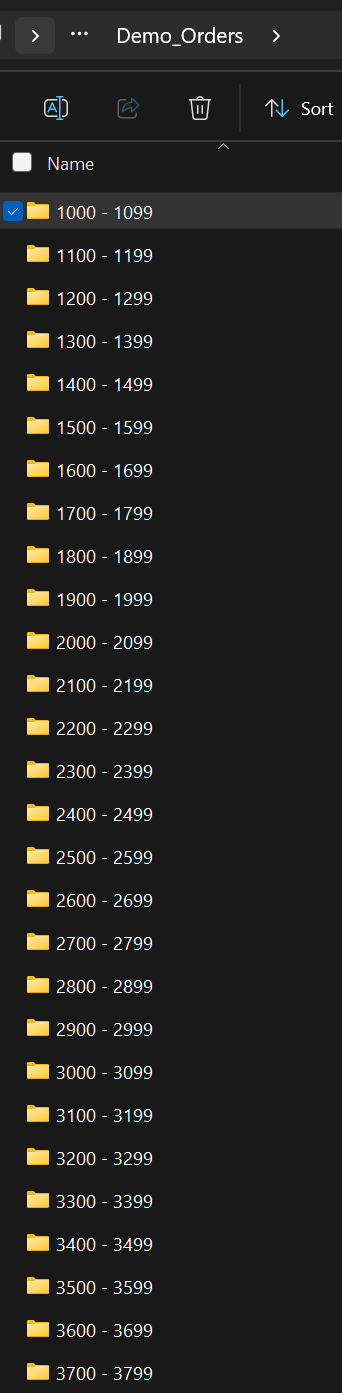
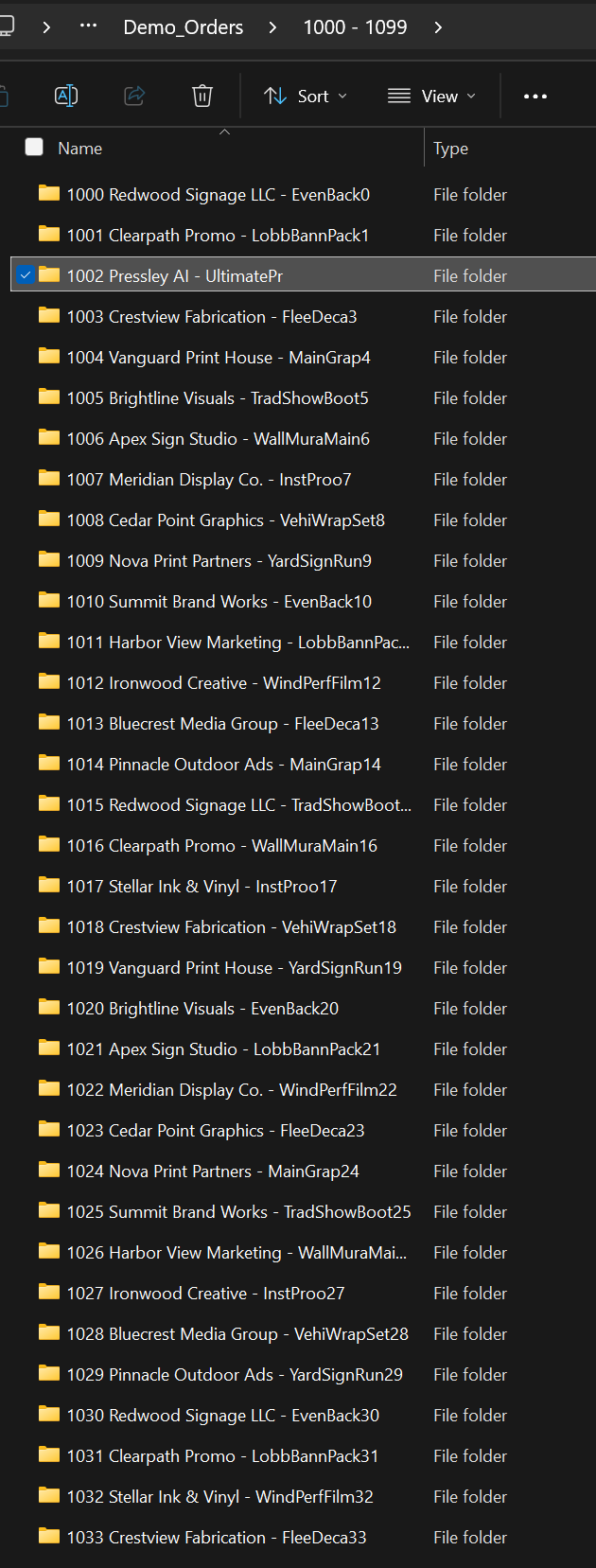
Real directory trees on your dedicated hosted server—using your captured layout. Active Pressley jobs live here; many shops also mirror or archive to their local NAS when jobs complete. Screenshots below are from one customer shop, shown as an illustration.

Client job folder structure on the file server — full directory tree
Docket ranges and job folders at a glance.
Inside a job folder — Working, Submit, Print, Proof, Support
Example inside one shop’s job folder—your names and nesting will match what we configured for you.

Sample directory (abbreviated)

Illustration only—Pressley builds the structure you specify at onboarding, not this exact tree.

company
├── Dockets
│   └── 26200 - 26299
│       └── 26200 ABC Company - Example Order
│           ├── 1_Working
│           ├── 2_Submit
│           │       ├── 26200 - Submit
│           │       └── 26200 - Print_As_Is
│           ├── 3_Print
│           │   └── 26200 ABC Company - Example Order
│           │       ├── 1. Print
│           │       └── 2. Cut
│           ├── 4_Proof
│           └── 5_Support

Who Wins When Folders Run Themselves

Sales, CSR & PM

With a Pressley seat—submit jobs in parallel, no “wait until prepress makes the folder.” Drop PDFs; Pressley handles placement.

Prepress

Predictable paths every job. Less time building trees; more time on hard art, color, and quality calls.

Production & RIP

Print folders always mean the same thing. Fewer wrong-file pulls and less idle press time hunting paths.

What happens next in the pipeline

Book a Personalized Demo